
Simulation Library
Cross-pollination analysis
Reuse demonstrations: other conditions
The 25 simulators above are Lyme disease and Long COVID, the two conditions the tool was built and checked for. To see whether the same pipeline works on something else, two papers on other conditions were run through the same pipeline, with only a label and the scope sentence in the instructions changed. They are kept apart on purpose: no condition-specific federal evidence was curated for them and neither has been validated. One is a published study of chronic pain and numbness after lung surgery (outcome rates, no costs). The other is a cost-effectiveness study of emergency-department care for a collapsed lung; its dollar amounts are restated from 2022 to 2025 prices by the same code-side price-index check, which is general inflation, not medical-care inflation.
Frequently Asked Questions
What this page covers
A general reference for how DBbun works and how to read what it produces, independent of any one document. When you're reviewing a specific simulation, its own Operation Flow tab shows that simulation's real numbers at each step described below.
Start here
What can I do with this, and what is it worth?
DBbun turns a published paper or report on Lyme disease or Long COVID (or a few related documents together, up to five) into a working, checkable what-if model. In a few minutes you can:
- Upload a paperA PDF, Word, text or spreadsheet file; up to five related files together.
- See what it measuredEvery number is labeled observed, assumed or projected, with a map of 16 burdens.
- Change an assumptionPick a ready-made scenario or type your own numbers; every result recalculates.
- Check it, take it with youFederal checks run in code. Download PDF, Excel, CSV, Python and a FHIR export.
- See what the paper measured, what it only assumed, and what it never measured. Every number is labeled observed, assumed or projected, and a map of 16 kinds of burden shows which ones the paper covers.
- Change an assumption and watch the results move. Pick a ready-made scenario or type your own numbers; every result recalculates instantly.
- Check the paper against federal data. Figures such as case counts and dollar amounts are compared with CDC, labor-statistics and survey data in code, not by the AI model, and the result is shown, including when they do not match.
- Find out which assumptions matter most (Sensitivity) and, where the paper reports a per-period rate, look ahead (Forecast).
- Compare a Lyme paper with a Long COVID paper side by side and see what each condition's researchers could ask the other (cross-pollination).
- Read it in your own terms. One switch rewrites the summary and next steps for patients and advocates, care teams, or payers and policy teams. The numbers never change.
- Take it with you: a PDF, a nine-sheet Excel workbook, CSV files, Python source of the same model, and a prototype FHIR export with provenance. The Excel file is a snapshot of saved values; it does not recalculate.
Why it matters. A cost-of-illness paper is normally a static PDF. A patient cannot ask "what if my costs are 30% higher", an analyst cannot easily tell one study's figure from a population estimate, and the burdens a paper never measured are invisible. DBbun makes all three visible, and shows where each number came from.
What it is not. It is not medical advice, it never recommends or ranks treatments, and its results describe published studies and reports, not what will happen to any one person.
Who built this?

Uri Kartoun, PhD, founder of DBbun LLC in Cambridge, Massachusetts, designed and directed this simulator. AI tools wrote its code and text (the tools are named in the AI disclosure), with his continuous review, feedback and modification. He holds a PhD in Intelligent Systems from Ben-Gurion University of the Negev and is a Senior Member of IEEE and ACM.
- IBM Research, Center for Computational Health: Staff Research Scientist, 2016 to 2024, and IBM Master Inventor with over 80 patent applications.
- Massachusetts General Hospital and Harvard Medical School: Research Fellow, 2013 to 2016, working with electronic medical records.
- Microsoft, Health Solutions Group: Software Development Engineer, 2008 to 2012.
- Founder of EMRBots.org, a non-profit source of synthetic medical datasets used by more than 10,000 people.
- Recognition: IBM Outstanding Technical Achievement Award (2024); Phase 1 winner of the NIH NCATS OligoTox Open Data Challenge (2026; winners page); finalist in the DARPA Triage Challenge, data competition (2026; finalist teams); runner-up in the U.S. Department of Energy Office of Electricity Feeder of the Future Prize, suburban track (2026; announcement); selected for NSF I-Corps, MIT New England Hub (2026); author of the letter "AI and the Evolving Role of the Scientific Paper" in Communications of the ACM (April 2026), printed with a reply from Vint Cerf.
ORCID · LinkedIn · dbbun.com · GitHub repository of this public demo
This is an independent entry by DBbun LLC. It is not endorsed by HHS or NIH, and no past employer, funder or challenge host (including DARPA, the Department of Energy and NIH) has reviewed or endorsed it.
Does it work on phones and tablets, and is it easy to read?
Yes, with limits. The public demonstration adapts to phones and tablets: margins tighten, cards stack, and on small screens the large charts are replaced by lists with the same information. The design was prompted by feedback that patients may find screens hard to read. That is why the body text is 18 pixels, the results pages are mostly black, white and gray with color mainly in the charts, and every simulator and comparison has a spoken overview with a transcript (the voice is synthetic).
What this does not mean: the design has not been tested with patients and has not had a formal accessibility audit. Blue and orange mark the two conditions in charts and cards, and the labels name them as well.
Walkthrough: change one assumption and see what happens (one study, step by step)
This example uses the Maryland Lyme disease cost study (Zhang et al., 2006). Every number below is what the simulator itself computes.
- Open it. In the Simulation library, press the “Lyme disease” button near the top of the list, find “Lyme Disease Economic Burden Simulator (Maryland Eastern Shore, 1997-2000)”, and press Open.
- See what the paper measured. The Overview tab shows five inputs, all labeled observed: they come from the paper.
- Read the starting result. In the Explore tab, “Recomputed nationwide economic impact” starts at about $194 million: a combined cost of $8,172 per patient times 23,763 reported cases, in the paper’s year-2000 dollars.
- Change one number. Move “Per-patient direct medical cost” from $2,970 up to $4,000, the top of its range. The combined cost per patient becomes $9,202 and the nationwide figure rises to about $218.7 million. The late-versus-early cost results do not move, because they do not depend on that input.
- Or try a ready-made scenario. “Combined worst-case underestimate” raises the cost per patient to $11,000 and the case count to 35,000 (the authors caution that both may be understated). The nationwide figure becomes about $385 million, roughly twice the starting value.
- See what the paper was checked against. The Evidence & Sources tab shows that the paper’s case count equals CDC’s reported count and restates its dollars in 2025 prices.
These are illustrative what-if results from one published paper, not forecasts, and not advice for any person.
Is this just a simulator? What makes it different?
A simulator on its own is a set of adjustable formulas. DBbun adds the parts that make the numbers trustworthy and useful:
- Evidence labels on every number: observed, assumed or projected, plus the period, the price year and who bears the cost where the paper says.
- Code-computed federal checks: the arithmetic and the comparisons with federal data are done by ordinary code you can inspect; the AI model reads the paper and writes wording, and does not compute.
- A gap map: across the library, six of the 16 burdens are measured by no simulator for either condition, and each paper covers only a few. That absence is shown instead of hidden.
- Cross-paper comparison: saved Lyme-versus-Long COVID comparisons turn each mismatch into a question worth asking.
- Three readings of the same evidence, for patients, care teams and policy teams.
- Provenance and portability: every download records which model calls produced it, and the Excel, Python and FHIR-shaped files let other tools reuse the model.
- A repeatable pipeline that builds a new model from a new paper, with its own checks, tests and quality log.
"Simulator" is the short name used on the page: a calculator built from published research (usually one paper, or a few related documents), where you change a number and see what changes.
What is the difference between the public demo and the full tool?
The public demo is read-only. You can open all of the simulators, change assumptions, read every tab, read the saved comparisons and download bundles. Generating a new simulator from your own document, deleting, the administrator tab and the programming interface run in the full tool on Dr. Kartoun's computer. The public bundles are trimmed: they leave out the uploaded source paper (it may be copyrighted; the Evidence tab links to it), the large raw federal files, the application source code and the full model-call audit trail.
How the interactive tool looks. This GitHub version is a read-only demo of finished simulators. The interactive tool, where you upload a document and watch it being processed, runs in a private setting (Dr. Kartoun(Dr. Kartoun’s computer)rsquo;s computer). These are real screens from one real run, on a public CDC/NCHS data brief about Long COVID in children (it reports percentages, not costs).
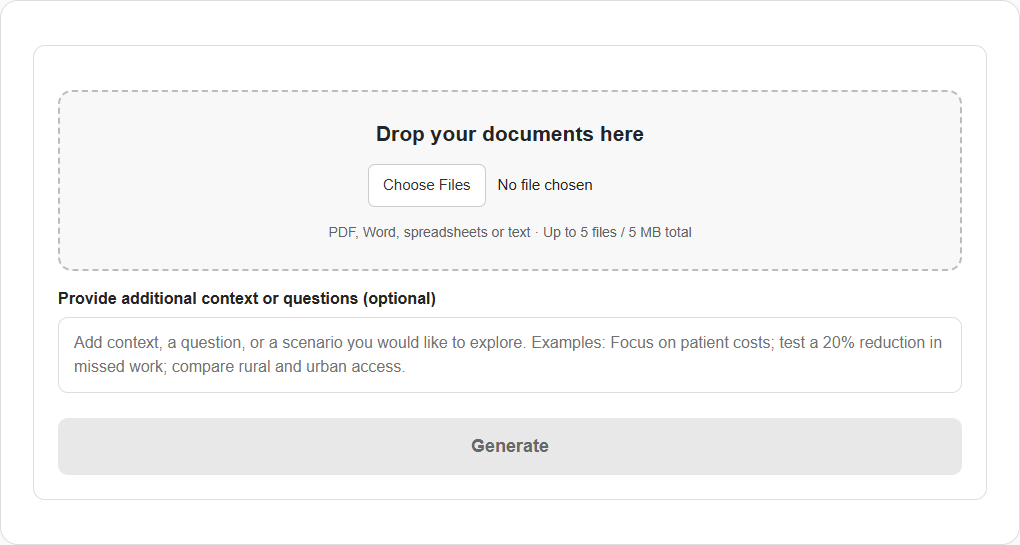
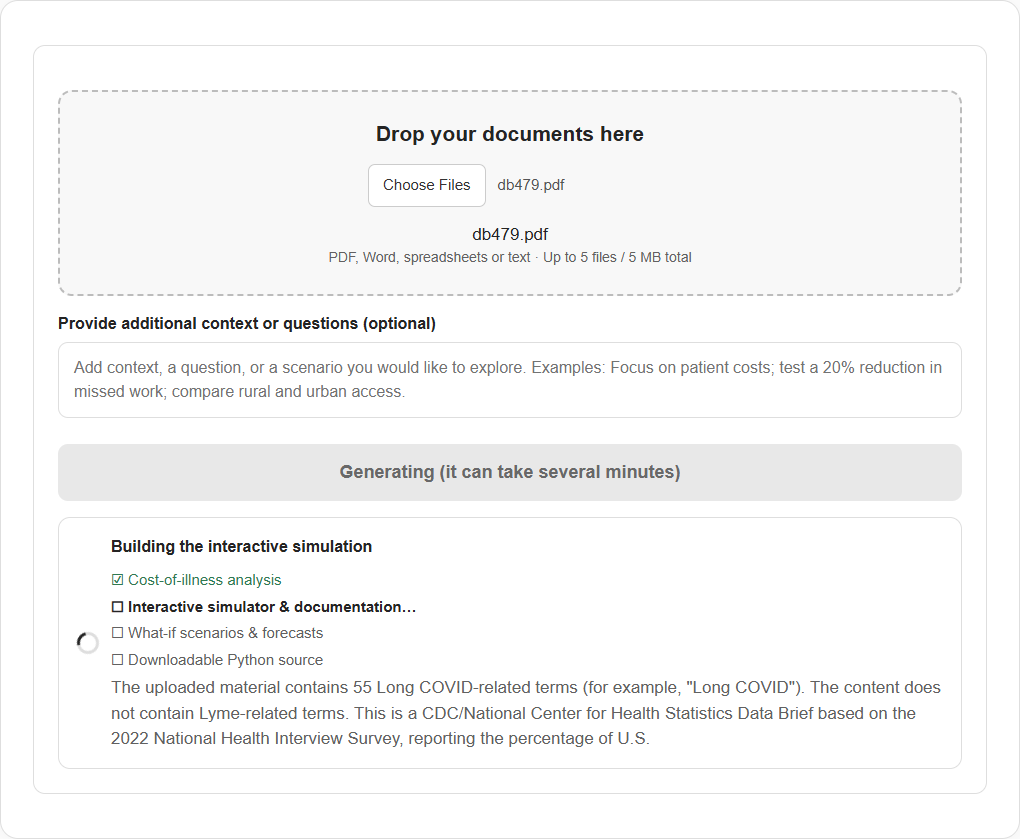
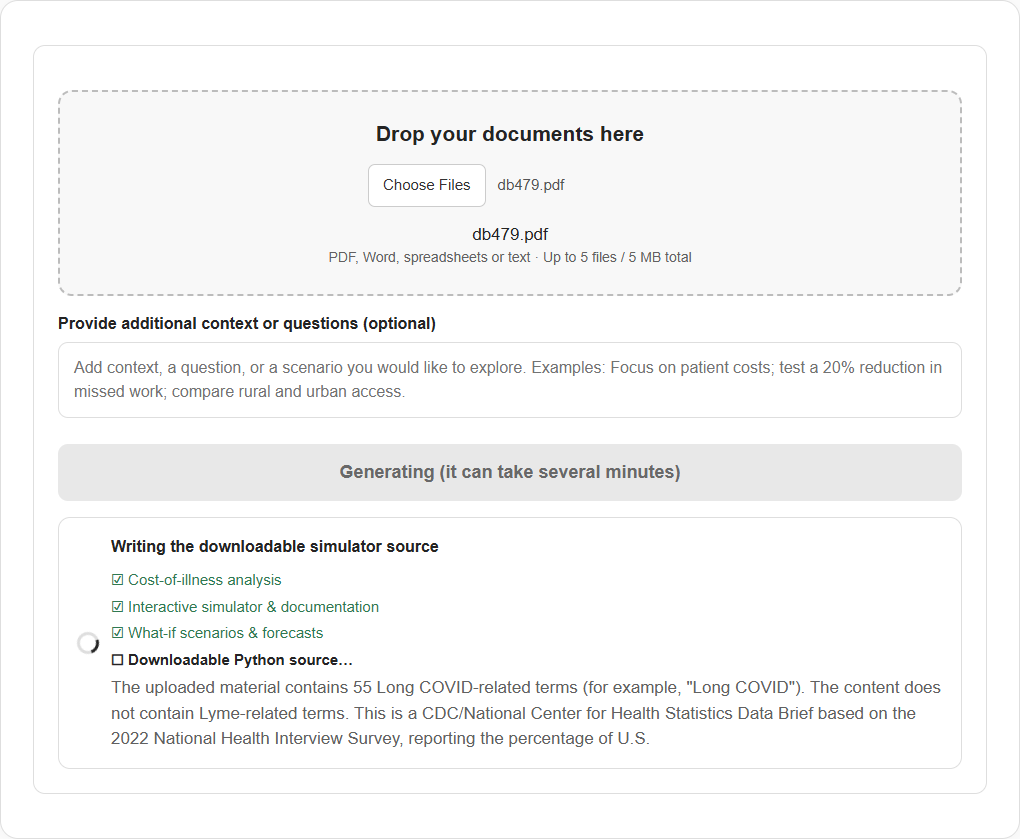
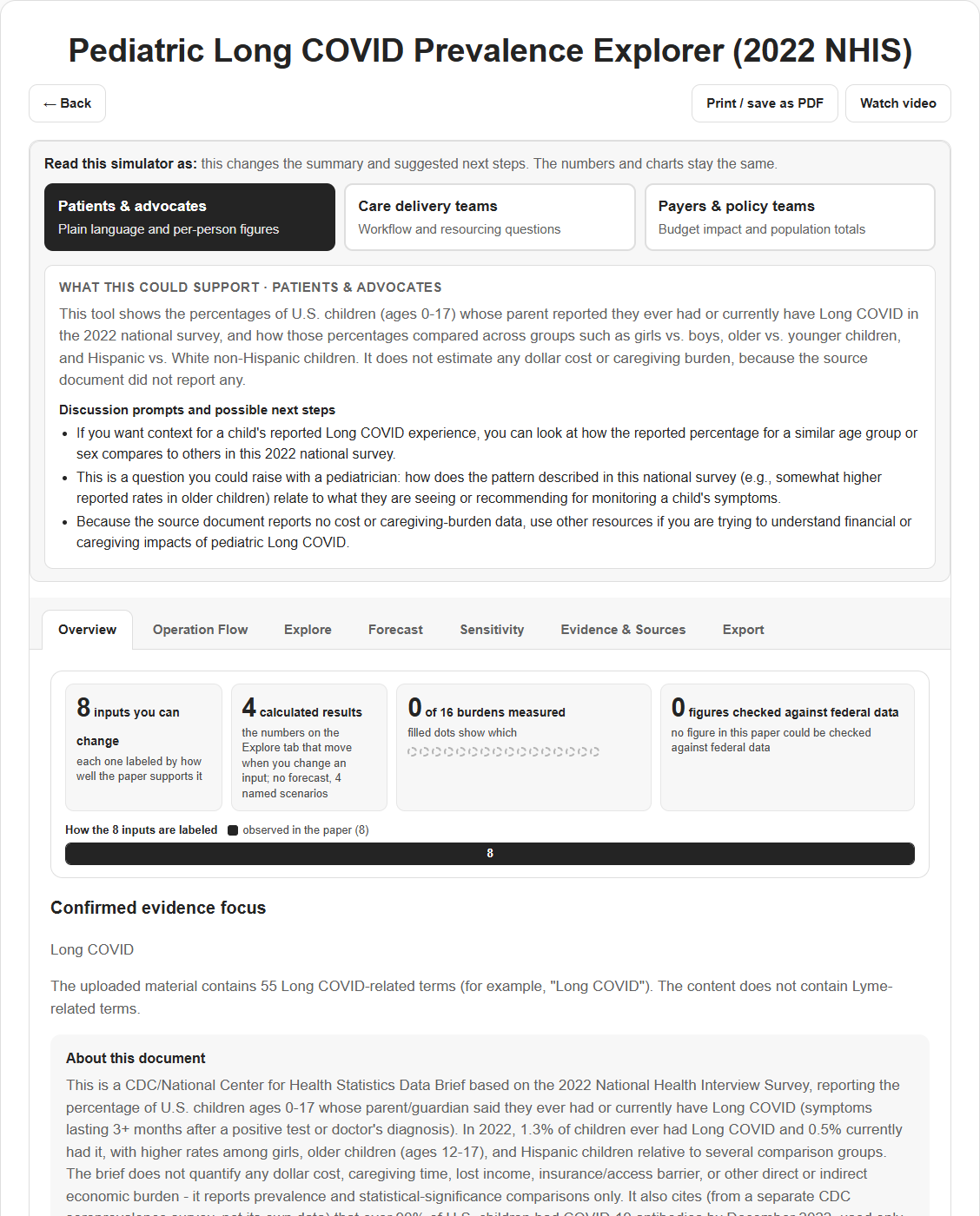
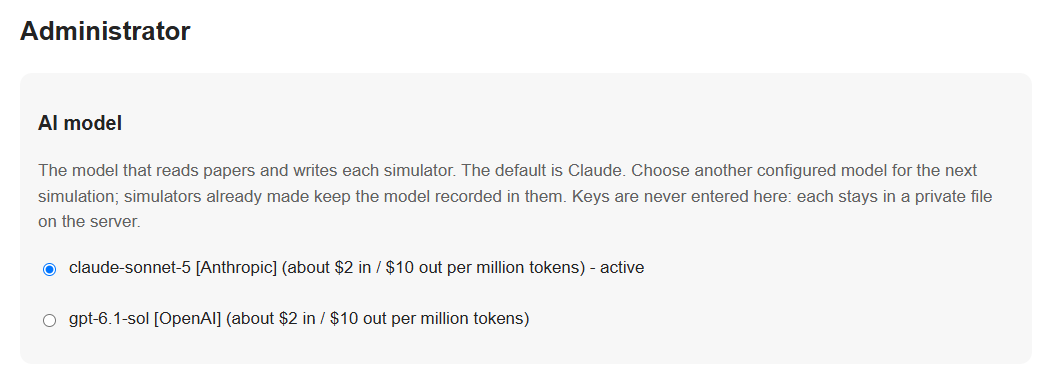
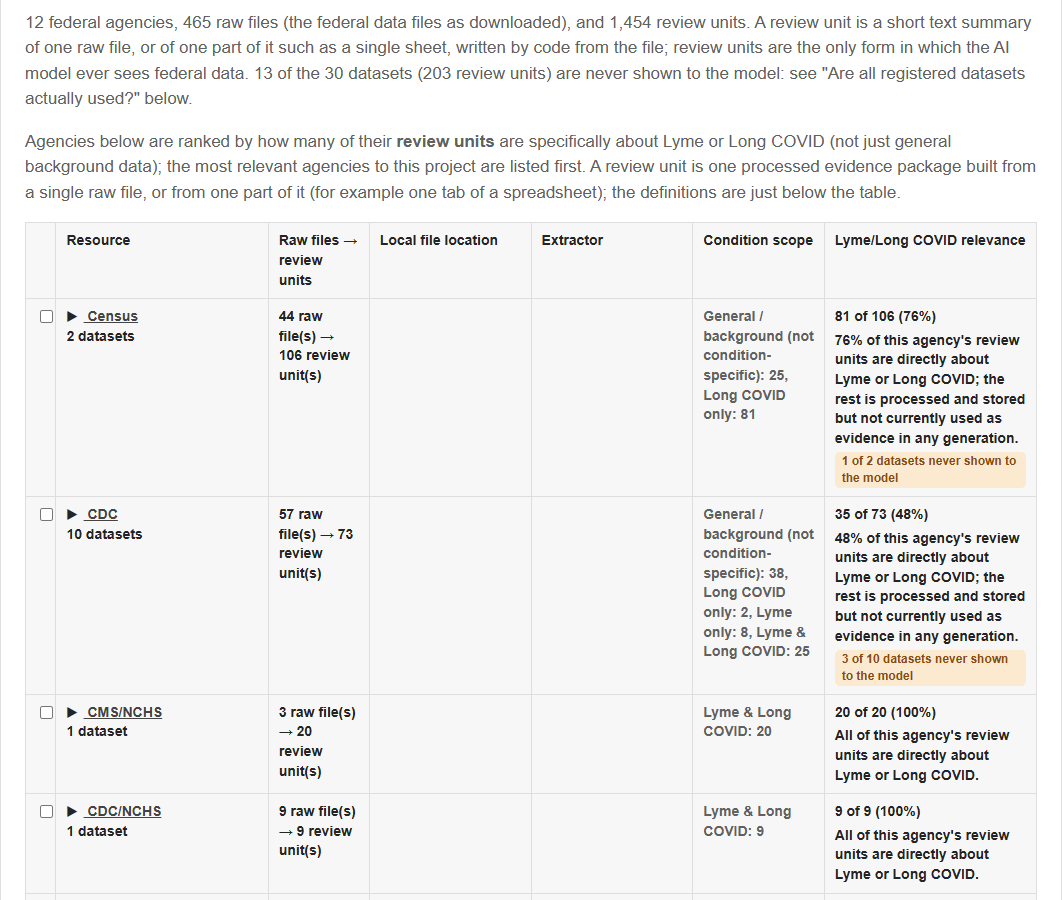
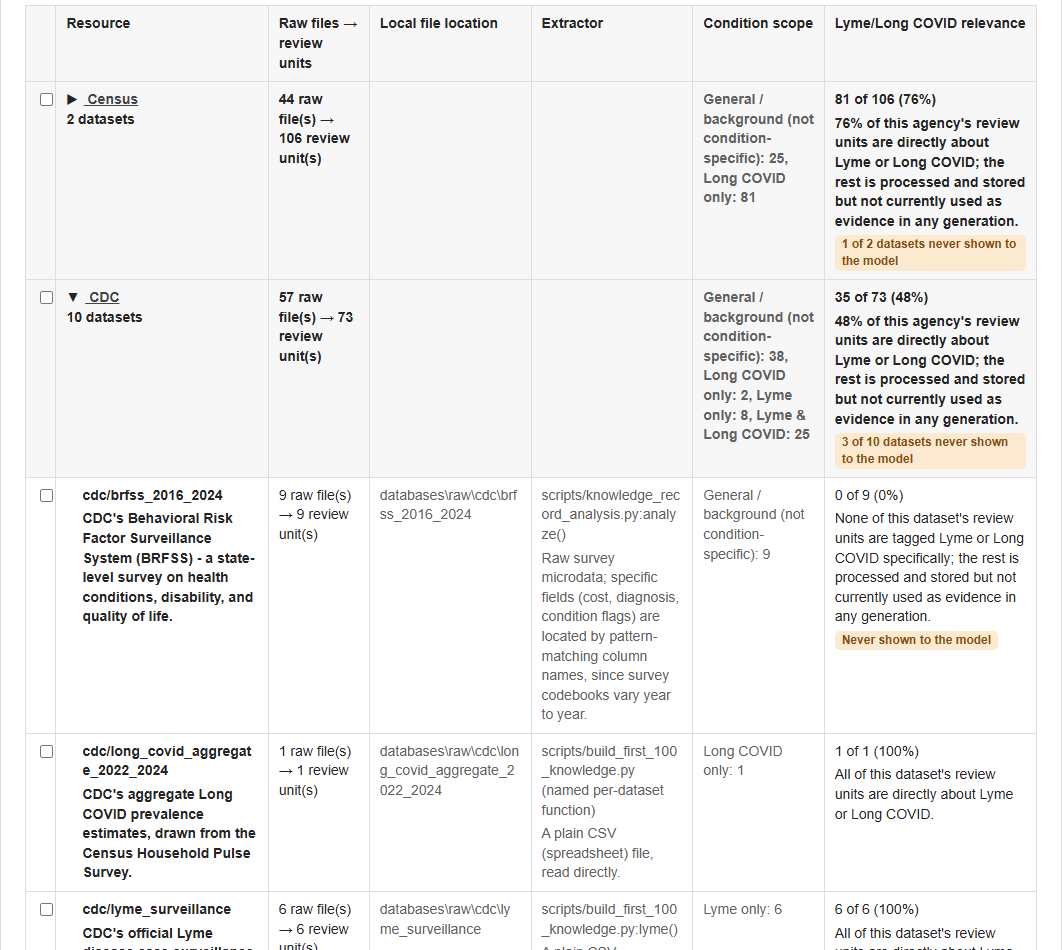
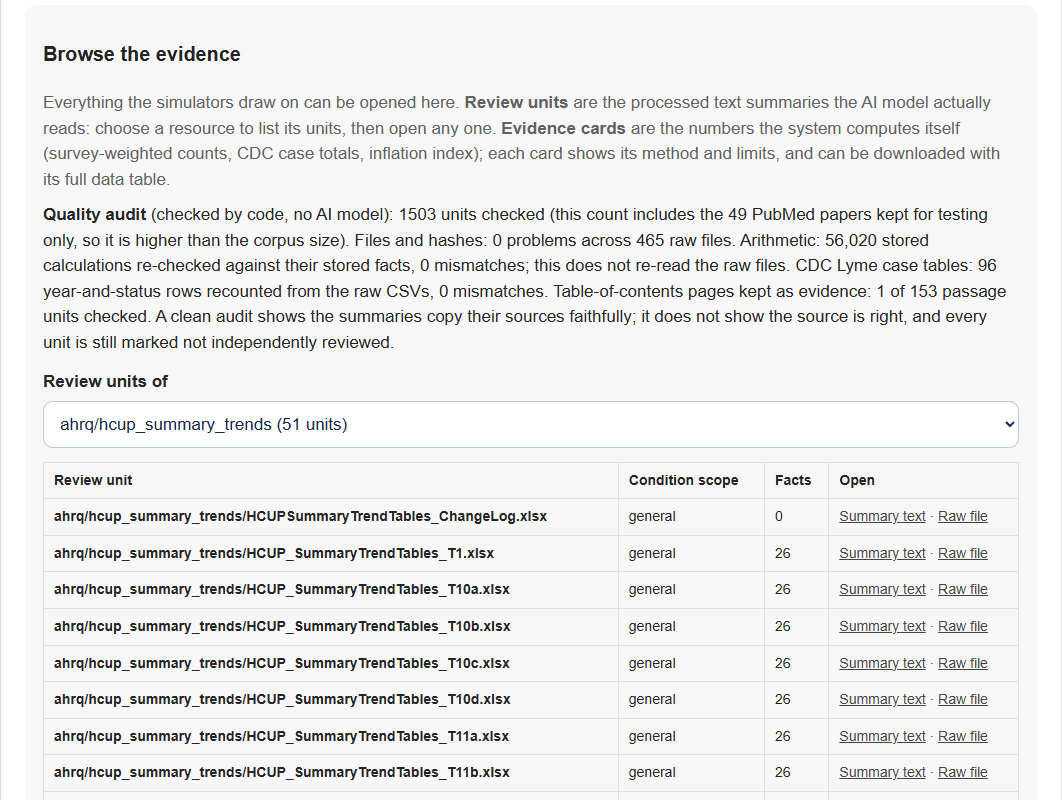
The Administrator tab (full tool only). The public demo hides it, because it changes the corpus and starts paid runs. These are real screens from the full tool. The folder prefix in the file locations is trimmed for the pictures.
Using the library
How do I read the library map (25 simulators by 16 burdens)?
Each row is one simulator, shown as its paper's first author and year, newest first, in two groups (Lyme disease and Long COVID). Each column is one of the 16 burden categories, grouped into six families (money and livelihood, carried at home, effects on the person, getting a diagnosis and care, system harm, and a measurement gap). A colored cell means the simulator has at least one result for that burden; the number is how many. A blank cell means that simulator does not measure it, which is a gap in what it covers and not proof the burden is absent. The bottom row counts how many simulators measure each burden, and a column marked 0 is measured by none. Hover or tab onto any number for a card with the actual results behind it, and select a cell to open that simulator.
What does "Read this simulator as" change?
Only the wording. Choose patients and advocates (plain language, per-person figures), care delivery teams (workflow and resourcing questions) or payers and policy teams (budget impact and population totals) and the summary, discussion prompts and next steps are rewritten for that reader. The inputs, formulas, results and charts are identical in all three, so no audience sees different numbers.
Using each tab of a simulator
Overview: what do I see first?
The title, then an "at a glance" strip: how many inputs you can change, how many results are calculated, how many of the 16 burdens are measured, how many figures were checked against federal data, and a bar showing how the inputs are labeled. Hover any tile for the detail. Below it are the original source with links, a plain-language summary of the paper, why it could be useful and what you could do with it, which assumptions move the results most, the 16-burden map for this simulator, and, where the paper reports it, who bears the cost.
Operation Flow: what happened to my document?
It shows how this particular simulator was built, step by step: the upload, local text extraction, the classifier that decides which condition the paper concerns, the retrieval of federal evidence, the AI model calls, and the automatic checks. The numbers on each step (documents, federal units offered, model calls, cost) are this simulator's own. It is there so that nothing about how the result was produced is hidden.
- UploadThe file you gave.
- Local text extractionText, tables and figures.
- Condition classifierWhich condition the paper concerns.
- Federal evidencePackages retrieved as context.
- AI model callsEach one recorded.
- Automatic checksValidation and federal checks in code.
Explore: how do the what-ifs work?
This is the interactive core. Under "Try a scenario" you can pick a ready-made what-if; under "Adjust the assumptions" you can type your own numbers. Every result recalculates immediately, in your browser, by ordinary arithmetic. Each result card shows the Default value beside the Selected value with the percentage change, and a "What changes?" panel lists which inputs differ from the default and which results they feed. A comparison table lays all scenarios side by side. Nothing you type is saved or sent anywhere.
What are the inputs (parameters), and which can I change?
An input is one number the model starts from: a figure the paper reports, or an assumption added to make a what-if possible. Each input shows its default, the range you can test, and its label: observed (the paper reported it, with the page or table), assumed (an assumption, with the range stated), or projected (a projection beyond what the paper reports). Where the paper gives them, the period, the price year of a dollar amount and who bears the cost are shown too. A few inputs, such as a price index, are fixed and locked. The test range is an exploration bound, not evidence: moving an input outside what the paper supports is your own assumption, and the "What each control represents" notes explain what each input stands for.
What is a named scenario?
A ready-made combination of changed inputs with a one-sentence goal, such as testing a case mix with more late-stage patients, or the longest waits and farthest travel. The AI model proposes the scenarios, but the code applies and calculates them, and they are labeled illustrative. A scenario is not a prediction; it shows what the model does when those assumptions are true. "Default assumptions" resets everything to the paper's own values.
Forecast: what does it show, and why do only some simulators have it?
A forecast projects one result forward over time, but only where the paper reports a per-period rate, for example visits per year. It assumes that rate repeats unchanged, so the line is straight. It is a reading aid, not a prediction. The darker band is the middle 80% of 500 random draws taken within each assumption's range, and the lighter band is the outer range if every assumption sat at its minimum or maximum at once; both are labeled illustrative and are not a confidence interval. The "Current assumptions" line is live: it redraws as you change inputs on the Explore tab. Many papers do not report a per-period rate, so many simulators have no Forecast content, and that is correct, not broken.
Sensitivity: which assumptions matter most?
It moves one input at a time across its supported range while every other input stays at its default, and shows how far each result moves. The summary chart ranks the inputs by their effect, and the sweep charts show the result at each step. It is a stress test of the model's own assumptions, not a measure of real-world uncertainty. These charts are a snapshot made when the simulator was generated, not a live view; use the Explore tab for live changes. Each chart has a "Show exact values" table.
Evidence & Sources: where do the numbers come from?
This tab is the audit. Bubble rows count where the numbers come from (observed in the paper, forecast lines, computed results), which federal datasets were offered to the model, how the paper's figures compare with federal data, and the named what-if conclusions. Below that are federal benchmarks that fit this simulator, computed by code from federal files and shown for context only, the federal knowledge summaries offered to the model, and the raw specification and generation details for technical inspection. Federal data checks and contextualizes a paper; it never supplies the simulator's numbers.
How do I read the "paper versus federal" chart?
Each row divides the paper's number by the matching federal number. The line in the middle means identical, a dot to the right means the paper's number is larger, and a dot to the left means it is smaller. A circle means they agree, a diamond means they differ, and a square means the comparison is context only, not a like-for-like match. A dot far from the middle is not an error: the two may count different things, such as claims-based estimates against reported cases, and a match does not prove either is right. Dollar amounts appear separately, as the same amount in the paper's price year and in today's prices; that is a conversion, not a comparison.
Export: what can I download?
- Open a simulatorAny simulator in the library.
- Go to the Export tabOr use "Print / save as PDF" at the top for a printable copy of what you are viewing.
- Download the bundleOne file with everything below.
- Documentation PDFThe formatted write-up.
- Excel workbookNine sheets: parameters, data, results, evidence and limits. Saved values; it does not recalculate.
- Figures and CSV filesIncluding 500 random draws.
- Spec.jsonThe specification of the model.
- Python sourceThe same model written as code.
- FHIR fileA prototype of the inputs and results, with provenance and the definitions it needs.
- README and noticeIn the full tool, also the model-call audit trail.
The bundle contains the formatted PDF documentation, a nine-sheet Excel workbook with parameters, data, results, evidence and limits, the figures and CSV files (including 500 random draws), the specification (Spec.json), Python source of the same model (generated by the AI model; for the 25 library simulators a check on 2026-10-10 reproduced the app’s results at the defaults and every named scenario, and a newly generated simulator’s file is not run automatically), a prototype FHIR file of the inputs and results with provenance and the definitions it needs, and a README and notice. The full tool adds the model-call audit trail. "Print / save as PDF" at the top makes a printable copy of what you are viewing.
Comparing Lyme disease and Long COVID
What is a cross-pollination analysis, and what do I get?
- Pick a pairTick one Lyme disease and one Long COVID simulator in the full tool. The public demo has saved pairs to read.
- Run the comparisonChoose "Cross-pollination analysis". Numbers are copied from the simulators; wording is checked in code.
- Read both papers side by sideCost, work, diagnostic delay, access to care and undercounting, and which of the 16 burdens each measures.
- See the questions worth askingCards, a chart of the two papers side by side, burden by burden, a chart of where the pair sits among all the simulators, and the other simulators that fill the gaps.
It sets one Lyme disease simulator beside one Long COVID simulator and asks what each condition's researchers could learn from the other. In the full tool you tick one of each in the library and choose "Cross-pollination analysis"; on the public demo you can read the saved comparisons. A comparison shows what each paper says about the same questions (cost, work, diagnostic delay, access to care, how official counts undercount), which of the 16 burdens each paper measures, the key figures copied from each simulator, and "a question worth asking" cards, such as whether Long COVID researchers could measure the time to diagnosis the way the Lyme paper did. One chart sets the two papers side by side, burden by burden, counting each paper's tagged results, and marks the burdens where only one paper has a result. A second chart places the pair among all the simulators, and a list shows which other simulators fill the gaps the pair leaves.
The numbers are copied from the simulators. The wording is written by an AI model and checked in code, and any number it cannot match is flagged. The two papers differ in population, year and method, so the comparison gives context and questions; it does not measure a difference between the diseases.
How it works and how far to trust it
Which federal resources are the most valuable, and why?
This ranking is overall, across the whole library: the simulations in the library. Resources are ranked by what each one lets the system do for a simulator, not by size. Some apply to one condition only; the label under each bubble says which. The "informs N of 25" numbers are a snapshot taken on 2026-10-05, when the library had 25 simulations (12 Lyme disease, 13 Long COVID). "Shown" means offered to the AI model as background.
Two patterns stand out. Value is concentrated in a few small, checkable sources (CDC surveillance, the inflation index, the health-center visit survey, the Long COVID prevalence survey) and not in how large the corpus is: a big library does not by itself make the tool better, what matters is which sources let it check a figure or add context. And "shown" is not "used": only a computed cross-check proves a federal number was compared with the document, so the number on each bubble says how many of the 25 simulators the source was shown to, listed beside, or checked against. It is not a measure of how much the source shaped a result.
How does the simulator actually work?
- Read the documentThe text, table captions and figures are extracted by DBbun.
- Classify itA local classifier decides: Lyme disease, Long COVID, or both.
- Pick federal evidenceThe most relevant pre-built packages are selected from the federal library.
- Four AI callsAnalysis, then the simulator, then scenarios and forecasts, then Python source.
- Code checks and exportsCode validates the model, runs the federal checks and builds the downloads.
- You upload a document. DBbun extracts its text and, separately, a local machine-learning classifier decides whether it's about Lyme disease, Long COVID, or both - no manual tagging needed.
- That classification drives a retrieval step over a federal knowledge library of about 1,454 units from 12 agencies (including CDC, CDC/NCHS, CMS, AHRQ, Census, BLS, BEA, HRSA, SSA and NOAA): the most relevant pre-processed federal evidence packages are selected and included alongside your document.
- Four AI (Claude/Sonnet) calls then run in sequence, matching the checklist you see while a simulation is generating:
- Cost-of-illness analysis - reads your document(s) plus the retrieved federal evidence and extracts the scientific findings (a plain-language summary, which costs/burdens the document actually reports, and limitations like claims-undercounting or a funding gap).
- Interactive simulator & documentation - turns that analysis into the actual interactive model: the inputs, outputs, and formulas connecting them, plus the takeaway/next-step text for each audience and the written documentation.
- What-if scenarios & forecasts - using the already-built, already-validated inputs and outputs, generates the named one-click scenarios and the multi-period forecast trajectories on the Forecast tab.
- Downloadable Python source - generates a standalone Python version of the same model for the bundle; runs separately and does not block or change the interactive result above if it fails.
- Nothing here queries a live database or a live internet search at generation time - every federal fact came from the pre-built local library, and every document-specific fact came from what you uploaded.
What does combining the paper, federal data and the simulator reveal?
Each piece alone leaves something hidden; together they show more. The diagram shows what each adds and what each overlap means. Hover any region for its meaning, or read the seven cases below, one per region, with a real example.
The paper alone: its own figures, in one price year and one place. The numbers exactly as the PDF prints them, for example a cost of $1,965 per patient in 2000 dollars, from one region. You cannot adjust them, compare them with today's prices, or see what they leave out.
Federal data alone: national context, not this paper in particular. Federal sources describe the country, for example about 35,000 Lyme cases reported to CDC in a typical year. They cannot tell you what a particular paper's patients cost, and some cannot identify Lyme at all (MEPS).
The simulator alone: what-ifs, forecasts and 16 burden types. The tool's machinery: adjustable assumptions, named scenarios, a forecast, and the 16 burden categories. On its own it is empty; it needs a paper's evidence to fill it.
Paper and federal data: checked and restated. The system takes figures the paper reports and compares them with federal data, in code. A dollar amount is restated in current dollars ($1,965 in 2000 is about $3,674 today, so the paper alone understates today's burden by 1.87 times). A case count is compared with CDC's (that paper's 23,763 national cases equal CDC's reported count).
Paper and simulator: burdens the paper never measures. Once a paper's results are sorted into the 16 burden categories, the empty categories show what the paper leaves out. Across the 25 simulations (12 Lyme disease, 13 Long COVID) the average paper measures 1.4 of the 16 and none measures more than 3, so most of the burden is invisible in any single paper.
Federal data and simulator: benchmarks beside your results. Each simulator's Evidence tab lists federal figures that fit it, for example the 15.9% of U.S. adults who cared for a friend or family member in the past 30 days. They let you read the paper's numbers against national context. They are context only: they do not feed the simulator's numbers.
All three: adjustable and checked, with the gaps stated. Adjustable means you can change the paper's assumptions in the number boxes and watch the results move. Checked means the paper's figures were compared with federal data by code, not by the AI model. Gaps stated means the caveats and the unmeasured burdens are shown, not hidden. Example: a paper's 35,000 reported Lyme cases matched CDC's 34,973 (within 0.1%), and its 476,000 claims-based estimate is 13.6 times the reported count; in the simulator you can change the assumptions behind that gap and see what moves.
These are examples from real runs, not a controlled study. Only some papers report figures that federal data can check (12 of the 25 simulators computed at least one federal check, and 10 of those compared a figure with federal data; the others only restated dollar amounts in current dollars), and the burden categories are assigned by an AI model, with at most one category per result.
What do "observed," "assumed," and "projected" mean?
- Observed - a value the source document actually reported or measured.
- Assumed - a value DBbun filled in because the document didn't report it, always clearly labeled as an assumption, never presented as if it were observed.
- Projected - a value computed forward from an observed or assumed rate of change (used on the Forecast tab), a straight-line continuation, not a prediction that real-world change will stay steady.
- This labeling is the single thing DBbun is most consistent about: every number you see traces back to one of these three, never an unexplained figure.
What do the burden categories mean?
When a result clearly represents one of these kinds of burden, DBbun optionally tags it so the Explore tab can group it into a named section. A document is never forced to touch every category - most won't, and that's expected.
These categories overlap as ideas, and that is expected. One real situation can touch several: a delayed diagnosis can cost a job and lead to uncovered spending. Each result (an output or a forecast) gets at most one tag, the best fit for the quantity it measures, so one simulator can have results in several categories.
Tags group results; they do not split a burden into shares that add up. Do not add numbers across categories or results unless the document itself does, because the same cost or hour can appear in more than one place (double counting). To choose between neighbors, ask what is being counted (money, time, harm, a score, or a gap) and who bears it.
The 16 categories at a glance
Related categories sit together. Colors group ideas; they do not rank them, and all bubbles are the same size because the categories are not ordered. Select one to see what it measures. A dashed line joins two categories that are easily mistaken for each other; hover or focus a line, or read “Told apart from” below, for the rule that separates them. A line with an arrow marks the two places where the table says one is often the cause of the other (being dismissed leads to delay and to emotional harm); that is a reading aid, not a finding from data. A thicker dotted line marks categories that can double count. Line length means nothing. The full table follows.
Select a category to read what it measures. Eight of the 16 carry a blue dot because their origin is documented here: people with lived experience described them or confirmed them. Several others, such as work and income and caregiving, were first drawn from interviews with people with lived experience.
| Category | What it measures | Easily confused with | Example measure |
|---|---|---|---|
| Direct costs of care | Money paid directly for treatment, equipment, travel to appointments, or accessibility needs. | Administrative burden (time and paperwork, not money); Work and income (money not earned, not money spent). | Yearly out-of-pocket spending; cost per visit |
| Work and income | Lost employment, reduced hours, or work capacity that changes over time. | Longer-term opportunity costs (a changed life path, not this year's pay); Cognitive impact (a symptom, not an income loss). | Work hours lost; share unable to work |
| Longer-term opportunity costs | Lost education, career advancement, or future earnings, broader than a loss of current income; for a child, disrupted schooling such as a school change, home tutoring or missed milestones. | Work and income: if the quantity is present-day pay, use that; if a path changed (years of remote-only schooling, a lost career), use this one. | Years of schooling disrupted; tutoring hours; projected career earnings lost |
| Caregiving and household labor | Unpaid caregiving or household work that shifts onto family members. | Care continuity risk (who holds the knowledge, not the hours); the caregiver's own lost pay can also appear under Work and income. | Caregiver hours per week |
| Care continuity risk | Care that could collapse because one undocumented caregiver holds all the care-routine knowledge. | Caregiving and household labor (hours of work, not fragility). | Share of care that depends on one person |
| Congenital/parent-to-child transmission | The disease itself passing from a parent to a child, a burden landing on someone with no exposure event of their own. | Caregiving (labor, not transmission). | Transmission rate; number of children affected |
| Diagnostic delay | The delay and repeated consultations before an accurate diagnosis. | Medical disbelief (dismissal can cause delay, but this counts the time lost); Harm from misdiagnosis-driven treatment (active harm, not lost time). A cost gap between disease stages is severity, not delay. | Months to diagnosis; visits before diagnosis |
| Harm from misdiagnosis-driven treatment | Active harm from a treatment whose benefit for the diagnosis being treated is not supported by the evidence. | Diagnostic delay (passive time lost). | Treatment-related adverse-event rate |
| Barriers to reaching care | Costs from being unable to reach or obtain appropriate care: distance, provider scarcity, a setting that cannot accommodate accessibility needs. | Uncoordinated, fragmented care (people who are being seen, but by uncoordinated providers); Administrative burden (paperwork and insurance). | Travel distance; wait for a specialist |
| Medical disbelief and dismissal | Harm from being dismissed or told real symptoms are not real. | Diagnostic delay and Psychological burden are often the effects; disbelief is the cause being counted. | Share reporting being dismissed |
| Administrative burden | Disability applications, paperwork, or care disruption from an outside system such as insurance coverage churn or a legal dispute. | Barriers to reaching care (physical or supply barriers); Uncoordinated, fragmented care (providers not coordinating). | Appeals filed; months of coverage gaps |
| Cognitive impact | Limitations that make ordinary tasks take longer or require assistance. | Psychological burden (emotional, not thinking or task limits); Overall quality of life (a broad score). | Task completion time; share needing help |
| Psychological burden | The emotional and psychological cost to patients or caregivers, including from the care-seeking process itself. | Cognitive impact (thinking and tasks); Overall quality of life (a composite score that may include mood). | Anxiety or depression prevalence |
| Overall quality of life | A general health-related quality-of-life or functional-status loss (EQ-5D utility, QALYs or QALMs, SF-36-type scores). | Any specific category above: use this only when the result is the composite score itself. | Utility score gap; quality-adjusted life-months lost |
| Undercounted by official surveillance | The gap between a disease's true frequency or burden and what surveillance, claims coding, or public reporting captures. | Diagnostic delay (one patient's timeline); this one is a population-level measurement gap. | Estimated true cases versus reported cases |
| Uncoordinated, fragmented care | The burden of navigating several uncoordinated providers or specialists with no single point of coordination. | Barriers to reaching care (cannot get in at all); Care continuity risk (one caregiver's knowledge). | Number of specialists; hand-offs between them |
What did Dr. Kartoun hear from people, and what did he change?
DBbun was created by Dr. Uri Kartoun, founder of DBbun LLC, who designed and directed it; AI tools wrote its code and text under his continuous review, feedback and modification. He listened as well as read: people who live with these illnesses, care for someone who does, or work on them were contacted, interviewed or asked questions, and he changed the product after what they said. Many of the most significant changes followed feedback from government officials (federal program leads and a government deputy director), who questioned and reviewed the product throughout the 10-week sprint. During the sprint, many people were contacted online and in-depth interviews were held with patient advocates, a Long COVID patient and a government deputy director. The public stories and ideas shared in the LymeX Healthathon, a national Lyme storytelling challenge, were analyzed, and questions about hidden costs were posted on its public discussion board; firsthand Lyme patients replied (among them a nurse practitioner, an epidemiologist, a medical-anthropology researcher and a former federal working-group member). Below, each person or group points to what changed; open one to read what was heard. Everyone is described by role only; nobody is named. People who gave feedback are not authors, co-developers or sponsors of the product, and nobody has endorsed it. One-page log of what was heard and what changed (PDF). Supporting documents, one page each (PDF): quality assurance log, interoperability status, policy brief on unmeasured burdens and reference list. All five together: combined supporting documents (PDF, 5 pages).
A Long COVID patient who also does health research→Undercounting checkSurveillance-undercount categoryHow this was gathered and what was heard
How: One-on-one interview.
What was heard: Diagnosis codes miss much of real Long COVID (no code for post-exertional malaise; symptoms often coded as psychiatric); the same illness severity leads to very different money outcomes depending on occupation; a large monthly out-of-pocket cost that insurance does not cover.
What changed in the product: The system checks every document for claims and diagnosis-code undercounting and flags it, and a "surveillance undercount" category exists.
Lyme and Long COVID patients and advocates→Medical disbelief categoryHow this was gathered and what was heard
How: Interviews, email, and public posts on the LymeX Healthathon discussion board.
What was heard: Being dismissed, or told symptoms are anxiety, is a cost of its own.
What changed in the product: A "medical disbelief" category, so harm from dismissal shows up as a result and not only as a number of dollars.
Caregivers and advocates for Long COVID→Care continuity riskAdministrative burdenLonger-term opportunity costsHow this was gathered and what was heard
How: Interviews.
What was heard: One caregiver often holds all the knowledge of the care routine, and care collapses if that person is unavailable; insurance churn and paperwork interrupt care; years of remote schooling in place of school.
What changed in the product: "Care continuity risk", "administrative burden" and "longer-term opportunity costs" categories.
Firsthand Lyme patients on the LymeX Healthathon discussion board→Parent-to-child transmissionHarm from misdiagnosis-driven treatmentCare continuity riskFragmented care (confirmed)System-gap caveatHow this was gathered and what was heard
How: The public stories and ideas shared in the LymeX Healthathon were analyzed, and questions were posted on its public discussion board; several people replied.
What was heard: Illness passing from parent to child; harm from treatment given for the wrong diagnosis; care that depends on one person; care spread across many uncoordinated providers.
What changed in the product: "Congenital and parent-to-child transmission", "harm from misdiagnosis-driven treatment" and "care continuity risk" categories, plus a caveat for gaps in the healthcare system itself (for example clinicians not trained to recognize the illness). A reply about care spread across many providers confirmed the "uncoordinated, fragmented care" category, which had already been added from published research.
A parent who is also a Lyme patient→School and milestone examples"Does not recommend treatments" answerHousehold boundaryHow this was gathered and what was heard
How: A public reply on the LymeX Healthathon discussion board.
What was heard: A child's missed school and milestones, tutoring and accommodations, more than one family member affected, and a strong expectation that 'simulators' recommend treatments.
What changed in the product: School and milestone examples in the opportunity-cost category; a plain answer (below) that the simulator never recommends, ranks or evaluates treatments; household burden stated as something the simulators do not model yet.
A state health-policy official→9-sheet Excel exportHow this was gathered and what was heard
How: Call.
What was heard: Exploring scenarios on screen is not useful to a budget analyst; data that can be plugged into their own Excel models is.
What changed in the product: A structured Excel export (9 sheets, including parameters, data, results, evidence and limits) beside the PDF and bundle.
Federal reviewers and data stewards (expert feedback, not lived experience)→Observed / assumed / projected labelsSex and gender findingsProvenance linesMEPS Lyme cost limitHow this was gathered and what was heard
How: Sprint feedback sessions and office hours.
What was heard: Show what is real data versus assumption; be intentional about sex and gender differences; provenance matters (source, self-report versus clinical, when, modeled versus measured); MEPS cannot support Lyme costs.
What changed in the product: Every value is labeled observed, assumed or projected; sex and gender findings are stated whenever the evidence reports them; every federal figure carries a provenance line; the Lyme cost limit of MEPS is documented.
Federal reviewers for the cost-of-illness track (expert feedback, not lived experience)→Federal-source value rankingScenarios and forecast bandsCross-Pollination AnalysisHow this was gathered and what was heard
How: Sprint kickoff and the Alpha and Beta demo feedback sessions.
What was heard: Which federal resources matter most, and why; show a variety of what-if scenarios and how much the results vary, not a single answer; compare Lyme disease and Long COVID to learn from each ("cross-pollination").
What changed in the product: A ranked list of the federal sources, with the reason for each rank; named scenarios with a stated goal, sensitivity charts, and a forecast band showing the middle 80% of 500 random draws (labeled illustrative, not a confidence interval); and a Cross-Pollination Analysis that compares a Lyme disease and a Long COVID simulator side by side.
Federal reviewers: labels, uncertainty and consent (expert feedback, not lived experience)→Time and price-year labelsWho bears the costBurden mapWhat leaves the machineHow this was gathered and what was heard
How: Alpha and Beta demo feedback sessions.
What was heard: Label the time period of every number and keep dollar figures comparable across years; break cost out by who pays (health system, out of pocket, indirect); show where data are incomplete or only partly measured; make clear where uncertainty comes from; review consent and transparency expectations for health data.
What changed in the product: Data-period and price-year labels on numbers; a "Who bears the cost" table; a burden map showing which of 16 burdens a paper measured and which it left out; and plain statements of what leaves the machine, with every model call recorded in each download.
Does the simulator recommend or evaluate treatments?
No. It turns one uploaded paper's own evidence into an interactive model of burden and cost: what an illness costs in money, time, work, schooling and care. It never recommends, ranks or scores treatments, protocols, supplements or providers on its own, and it does not tell anyone what to do about their own health.
"Simulator" here means a what-if model of cost and burden that you can adjust (for example, what if diagnosis took a year less), not a treatment simulator. If a paper reports what a treatment costs or what it did, the simulator shows that as the paper's own reported evidence, labeled observed, assumed or projected, never as advice. For care decisions, talk with a clinician.
Which AI model does it use, and can that be changed?
The default is Claude (Anthropic). In the full tool, an administrator chooses the model in the Administrator tab: any configured model with a key on the server can be selected for the next simulation, and an OpenAI model is supported as well. Keys are never typed into the page; each stays in a private file on the server. Every simulator records which model made it, and the library shows that model on each row. The public demo is read-only, so it does not show the Administrator tab; the pictures under “What is the difference between the public demo and the full tool?” show it. The model only writes the wording and the specification: code does every calculation and every federal check, whichever model is chosen.
Can I use the simulators from another system or script (API)?
Yes. The full tool, run on your own computer, has a small programming interface (API) so another system can call a finished simulator or submit papers without a browser. The read-only public demo cannot run it.
- Make a keyOn your own computer. Every call needs one.
- Submit a paperIt joins a first-in, first-out line and runs one at a time.
- Collect the bundleAbout 4 to 9 minutes and $0.40 to $0.96 in model fees each (25 runs).
- Run it your waySend your own assumptions to a finished simulator; same arithmetic, no cost.
- Run a finished simulator. Send your own assumptions and get every output and forecast back at once. It uses the same arithmetic as this page, costs nothing, and rejects values outside an input's own range or inputs the source paper fixes.
- Submit papers and come back later. Papers join a first-in, first-out line and run one at a time (about 4 to 9 minutes and $0.40 to $0.96 in model fees each, measured over 25 runs; staff time, hosting and maintenance are not included). A script then collects the finished bundles.
- Access. Every call needs a key made on your own machine, and by default the interface answers only on your own computer.
Steps and examples are in the API guide (the file API.md); the machine-readable description is at /api/v1/openapi.json. Results are illustrative simulations built from the source papers, not clinical advice or statistical forecasts.
What role do federal data play in creating a simulator?
The simulator's numbers come from your uploaded document. Federal data plays four supporting roles:
- It decides what is eligible. The detected condition (Lyme disease or Long COVID) determines which federal datasets can be searched.
- It is offered as background. About 10 short excerpts from pre-processed federal summaries are shown to the model alongside your document. The model may cite one only if its population, definition, unit and timeframe genuinely fit.
- It is used in computed cross-checks. Every computed comparison ends with a provenance line: the kind of federal data (survey self-report, clinical visit record, surveillance report or price index), its period, and that code, not the AI model, did the arithmetic. Federal figures are published or surveyed values; the simulator's own outputs are modeled from your document. The model only reads certain quantities out of your document (dollar amounts with a price year, reported or estimated Lyme case counts, national Long COVID prevalence percentages). The system then compares them with federal data in code: it restates dollar figures in current dollars and compares case counts with CDC reported cases. A quantity it cannot check is shown as not computed, with the reason.
- It is shown as benchmarks. Every simulator's Evidence tab lists up to five federal benchmarks that fit its condition and burden categories, for example national Lyme case counts, Long COVID prevalence, or hours adults spend on health care paperwork. They are context for reading the results, not inputs: none of them fed the simulator's numbers. Each shows where it comes from, its period, and how reliable it is.
Limits of this approach (also stated in each simulator's Evidence tab, documentation PDF and Excel export):
- Federal data does not supply this simulator's numbers. They come from your uploaded document; federal data selects which sources are eligible, is offered to the model as background, and is used in the computed cross-checks.
- Retrieval is keyword-based and runs once per document, choosing about 10 excerpts rather than one per figure, so the best match for a specific figure can be missed.
- Only three kinds of figures are cross-checked in code: dollar amounts (restated in current dollars with the CPI-U inflation index, 1913-2025 price years), Lyme reported or estimated case counts (compared with CDC surveillance), and national Long COVID prevalence percentages for 2022-2024 (compared with the CDC/Census Household Pulse Survey). Everything else is context only.
- Coverage gaps: there is no NIH research-funding data yet, and Long COVID breakdowns by sex, age and race are not yet computed. MEPS releases a 3-character diagnosis code only when at least 30 sampled people carry it, so the Lyme code (A69) is missing from most recent years. In a written answer to the sprint, an AHRQ data steward said the pooled sample is too small for good Lyme cost estimates and urged caution.
- Federal data is a downloaded snapshot (mostly through 2023-2025) and is refreshed by hand.
- Sources measure different things (surveillance reports, insurance claims, surveys) and change definitions over time, so a comparison shows whether numbers sit in the same range, not that either is right. Claims- and code-based sources also undercount.
How does DBbun relate to federal health-data standards (Blue Button 2.0, FHIR, TEFCA)?
DBbun is a local tool that turns an uploaded paper into a simulator. It does not connect to any real health-record network (its Blue Button 2.0 demonstration uses the CMS sandbox, which holds only synthetic people), and it does not claim alignment with a standard it does not implement. Its downloads are PDF, Excel, CSV, JSON and Python source, plus a FHIR R4-shaped demonstration export (fhir_demonstration.json) of each model's inputs and default outputs, with the source paper and provenance. That export is a demonstration: it contains no patient, is not clinical data, uses DBbun's own identifiers, is not profiled to US Core or USCDI+, and has gone through no certification. Every simulator's file passes the official HL7 FHIR validator (R4) with no errors; terminology checking was switched off, and best-practice warnings remain because there is no patient. The definitions of DBbun's own extensions ship beside it in fhir_definitions.json. Here is where it stands with each:
The Blue Button sandbox demonstration, in four steps
- Sign inA standard OAuth 2.0 sign-in with PKCE, against the CMS sandbox.
- A test person sharesOnly synthetic test beneficiaries exist in the sandbox.
- Claims are readCoverage and ExplanationOfBenefit, as FHIR R4.
- Yearly totals appearHeld in memory and shown beside a simulator in the Evidence & Sources tab.
- Blue Button 2.0 (CMS): demonstrated against the CMS sandbox, with synthetic test beneficiaries only. A working sign-in (OAuth 2.0 with PKCE) lets a person share their claims; DBbun reads Coverage and ExplanationOfBenefit as FHIR R4, reduces them to yearly totals held in memory, and shows them beside a simulator in the Evidence & Sources tab. It has no access to real Medicare data and has not been through CMS production review. The public demo shows a saved example from a real sandbox run, because the live sign-in runs in the full tool.
- TEFCA and FHIR networks: designed for exchanging identified clinical records between care institutions. DBbun refuses uploads that contain Social Security numbers or medical-record-number and date-of-birth labels (it does not detect other kinds of identifiers), and it is not a care-coordination system, so it does not connect to them.
- USCDI+: at the last check (August 2026) it had no cost-of-illness domain. A small, honest step would be tagging extracted diagnoses with their ICD-10-CM codes; that is not built.
- CMS Interoperability Framework: DBbun echoes its consent and transparency criteria at its own scale. The extracted text, table captions and figures of your document reach the model (never the original file), no generated code executes, and every model call is recorded in the download. It claims no formal alignment.
Does it work for conditions other than Lyme disease and Long COVID?
The tool was built and checked for Lyme disease and Long COVID. To see whether the pipeline reaches further, two published papers on other conditions (Cattoni et al. 2021 on chronic chest pain and numbness after keyhole surgery for a collapsed lung; Davis et al. 2025, a cost-effectiveness study of emergency-department care for a collapsed lung) were run through the same four-step pipeline; only a label naming the condition and the scope sentence in the instructions were changed. Each produced a working simulator, with every number from the paper labeled and the Excel, PDF and FHIR-shaped exports. It is shown in its own labeled section at the bottom of the Simulation library, outside the 25 simulators and the 13 comparisons.
What that does not show: no condition-specific federal evidence was curated for these conditions, and nobody has validated the results. The surgery paper reports clinical outcome rates, not costs. For the cost paper, the only federal check is the general consumer price index, which restates its 2022 dollar amounts in 2025 prices; that is general inflation, not medical-care inflation, and not a comparison with federal cost data. These are two examples, not a claim that the tool works for every condition. Adding a condition properly means curating its federal evidence.
What are the limitations ("Gaps and Boundaries")?
Four checks DBbun runs against every document, each only flagged when the document itself supports it - never inferred from general outside knowledge or from the condition's identity alone.
- Claims/diagnosis-code undercounting - flagged when a cited figure is based on insurance claims or diagnosis codes, since real case-finding research shows these codes miss a large share of true cases - especially relevant for Lyme and Long COVID, which don't always have a clean diagnostic code.
- Subgroup disaggregation - flagged when a document reports only one pooled, population-wide figure without checking whether it holds the same way across sex, age, race/ethnicity, disability status, and other groups - not a missing number, a missing check.
- Funding gap - flagged when a document itself reports a real disparity in research funding or investment for this condition, compared to another condition or across time.
- Systemic gap - flagged when a document describes a gap in the healthcare or research SYSTEM itself, not a cost to any one patient - for example, clinicians lacking training to recognize the condition, or findings with no clear path to becoming standard care.
What the simulators do not model.
- Household burden. Each simulator describes one person or one cohort, as the uploaded paper does. Where several members of a household are affected, for example a parent and children, it does not add up the burden across them.
- Care the paper does not price. Non-covered tests, supplements and other out-of-pocket care are counted only when the uploaded paper itself reports what they cost.
What happens to my uploaded document? Is my data private?
- Your fileThe original file is never sent to the model provider.
- Text extractedThe text, table captions and figures are read out of it.
- Only that goes to the modelNo generated code runs on your machine or on DBbun's server.
- Every call recordedA fingerprint, the provider and the time, never the text itself.
- The extracted text, table captions and figures of your document are sent to the AI model. The original file itself is never uploaded to the model provider.
- The app does not execute generated code on your machine or DBbun's server - the downloadable Python source is for you to run yourself, not something DBbun runs on your behalf.
- Every model call made for your simulation - a fingerprint of what was sent (not the text itself), to which provider, and when - is recorded and disclosed, visible in the "Generation details and API usage" panel and the downloadable bundle's provenance file.
- What it accepts. Published papers and reports as PDF, Word, Excel or CSV, text, Markdown or JSON files. It does not accept videos, photos or scans such as CT or MRI, or medical records. It works from published research on cost and burden, not from any one person's health data, and it gives no diagnosis or medical advice. It refuses files that contain Social Security numbers or medical-record-number and date-of-birth labels (it does not detect other kinds of identifiers).
Can I trust the numbers?
- Every number traces to either your uploaded document, a named federal source, or an explicitly labeled assumption - never an unexplained figure.
- DBbun does not diagnose, recommend treatment, or replace your care team - it is a what-if model for interpreting a document's own evidence.
- Real defects found through live testing get fixed with a regression test, not just a one-off patch - the current automated test suite has 50+ tests and passes before every change ships.
Is the text written by AI, and is it watermarked?
- Yes. The analysis, documentation, takeaways and downloadable Python source are written by an AI model (Claude Sonnet); the numbers you can change are computed by the simulator itself.
- Anthropic, the provider of the Claude models, has said publicly that it embeds an invisible watermark in text from its Claude models to meet the European Union AI Act's transparency rules, and that the mark does not change the meaning, quality or readability of the text. DBbun has not checked which of its generated texts carry the mark. The bundle's NOTICE.txt carries the same statement.
What does the AI model already know on its own?
- The model behind DBbun (Claude Sonnet) was trained on a very large body of publicly available text, including research papers and government publications. Anthropic does not publish the full list of sources, and some publishers restrict the use of their content for AI training.
- Every model also stops learning at a cutoff date. Recent papers, and Long COVID research in particular (a condition first described in 2020 and still moving fast), may be unknown to it.
- For that reason DBbun never treats the model's background knowledge as evidence. A value should come from your uploaded document (with a page reference) or a cited federal source, and anything else is labeled an assumption. If you spot a figure that seems to come from nowhere, treat it as unverified and check it against the document.
Administrator
AI model
The model that reads papers and writes each simulator. The default is Claude. Choose another configured model for the next simulation; simulators already made keep the model recorded in them. Keys are never entered here: each stays in a private file on the server.
Agencies below are ranked by how many of their review units are specifically about Lyme or Long COVID (not just general background data); the most relevant agencies to this project are listed first. A review unit is one processed evidence package built from a single raw file, or from one part of it (for example one tab of a spreadsheet); the definitions are just below the table.
| Resource | Raw files → review units | Local file location | Extractor | Condition scope | Lyme/Long COVID relevance |
|---|
Browse the evidence
Everything the simulators draw on can be opened here. Review units are the processed text summaries the AI model actually reads: choose a resource to list its units, then open any one. Evidence cards are the numbers the system computes itself (survey-weighted counts, CDC case totals, inflation index); each card shows its method and limits, and can be downloaded with its full data table.
Evidence cards
Add a new resource
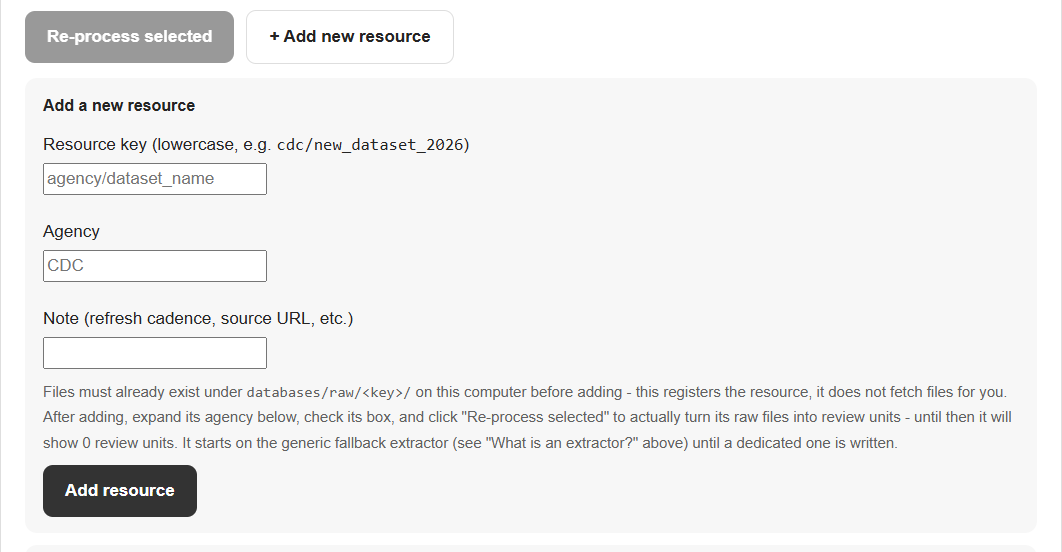
Files must already exist under databases/raw/<key>/ on this computer before adding - this registers the resource, it does not fetch files for you. After adding, expand its agency below, check its box, and click "Re-process selected" to actually turn its raw files into review units - until then it will show 0 review units. It starts on the generic fallback extractor (see "What is an extractor?" above) until a dedicated one is written.
What this page does
Manages the federal knowledge corpus every simulation draws evidence from. Select one or more resources below and re-process them from their real raw files, or register a new resource whose files you've already placed under databases/raw/. This directly changes the live corpus - each run backs up the previous state automatically before anything is touched, and restores it automatically if the run fails partway.
The library can grow in three ways. (1) Additional agencies: register a dataset from an agency beyond the current twelve, place its files under databases/raw/, then re-process it. (2) Later releases of existing datasets: for example data published for 2027 and forward: place the new files beside the existing ones and re-process that dataset. A new release in the same format is read by the existing extractor; a changed format needs the extractor updated. (3) Corrections: fix a source file or the extractor and re-process, with the automatic backup and restore described above. In every case the files must already be on this computer, because the tool does not download them.
Which federal resources are the most valuable, and why?
This ranking is overall, across the whole library: the simulations in the library. Resources are ranked by what each one lets the system do for a simulator, not by size. Some apply to one condition only; the label under each bubble says which. The "informs N of 25" numbers are a snapshot taken on 2026-10-05, when the library had 25 simulations (12 Lyme disease, 13 Long COVID). "Shown" means offered to the AI model as background.
Two patterns stand out. Value is concentrated in a few small, checkable sources (CDC surveillance, the inflation index, the health-center visit survey, the Long COVID prevalence survey) and not in how large the corpus is: a big library does not by itself make the tool better, what matters is which sources let it check a figure or add context. And "shown" is not "used": only a computed cross-check proves a federal number was compared with the document, so the number on each bubble says how many of the 25 simulators the source was shown to, listed beside, or checked against. It is not a measure of how much the source shaped a result.
Raw file, dataset, and review unit - what's the difference?
- Raw file - a file exactly as downloaded from the federal agency (a spreadsheet, PDF, zip archive, etc.), stored on this computer under
databases/raw/. The summary line at the top of this page shows how many there are. - Dataset - one named federal data program (for example, CDC's Lyme surveillance data, or AHRQ's MEPS survey). A dataset is usually made of several raw files (different years, states, or file parts). The table above groups the registered datasets by agency.
- Review unit - one processed, evidence-ready knowledge package produced from a raw file (or from one part of it: a tab in a spreadsheet, one file inside a zip archive). It is a short derived text summary with the facts and caveats extracted from that file, not the raw file itself. Review units are what the retrieval step searches and what the AI model is shown excerpts of. A single raw file often splits into several review units, so the review-unit total is larger than the raw-file total.
What does "condition scope" mean?
Every review unit is tagged with which condition it's actually relevant to, based on its own content:
- Lyme & Long COVID - directly relevant to both conditions.
- Lyme only / Long COVID only - relevant to just one.
- General / background - useful context (cost-of-living, wages, provider counts) that isn't specific to either condition.
- Not yet classified - hasn't been re-tagged since the last content change; re-processing fixes this.
What happens when I click "Re-process selected"?
- The current review units for the selected dataset(s) are backed up to a timestamped folder under
backups/- nothing is deleted until a safe copy exists. - Those review units are removed from the live index.
- The dataset's raw files are re-read from disk and turned back into review units, using that dataset's extractor (see below).
- Every review unit is re-tagged with its condition scope.
- If any step fails, the backup from step 1 is restored automatically - the live corpus is never left half-updated.
This is mostly deterministic parsing (reading spreadsheets, PDFs, and survey files) - no AI model call happens during re-processing.
What happens when I add a new resource?
- It only registers the dataset's name, agency, and a note - it does not download or fetch any files. The raw files must already exist under
databases/raw/<key>/before you add it, or the form will reject it. - A newly added resource starts with 0 review units until you check its box and click "Re-process selected."
- Until someone writes it a dedicated extractor, it uses the generic fallback reader (it detects whether the files are spreadsheets or text documents and processes them accordingly) - the same starting point every dataset here began from.
What is an "extractor"? Who wrote it?
- An extractor is a piece of this project's own Python code that knows how to read one particular raw file format (a multi-tab Excel workbook, a fixed-width survey file, a zip of CSVs, etc.) and turn it into review units the simulator can cite as evidence.
- Every extractor here was written for this project, by Claude (Anthropic's AI, working under Uri Kartoun's direction) as part of building this corpus - there is no separate vendor or team.
- The "Extractor" column below names the actual source file and function (for example,
scripts/build_first_100_knowledge.py:hcup()) - all under this project's ownscripts/folder on this computer. - It connects to the simulator indirectly: extractors only build the review-unit corpus ahead of time; when you generate a simulation, the simulator searches that already-built corpus for relevant review units, it never reads raw federal files directly.
Where does machine learning actually happen?
- Not on this Administrator page. Everything here (re-processing, adding a resource) is deterministic file parsing - no AI model is called.
- Machine learning runs later, on the Generate page, at the moment you upload a document: a classifier first determines whether it's about Lyme, Long COVID, or neither, then a retrieval model scores every review unit in this corpus for relevance to that document and selects the ones the AI model is shown as evidence.
- It always searches whatever is currently in this corpus - it never changes the corpus itself, so re-processing here is what determines what later generations can find.
How was this list of resources chosen?
- Most of this corpus (27 of the current families) was acquired and formally reviewed over Aug 14-16, 2026, before this app's Administrator page existed - each source was accepted for a specific, named modeling role (e.g. BEA regional economics for lost-income/productivity denominators, HRSA for provider-access and diagnostic-delay context), not just because a list named it. That acquisition was then explicitly locked: new sources are only added when one of five specific triggers is true (the simulator can't compute a required output, a field can't be safely interpreted, provenance is wrong, validation shows a real coverage/bias problem, or HHS/TOPx feedback explicitly requires it) - "cosmetic catalog improvements and speculative extra datasets do not reopen" that lock.
- Not the same as the official TOPx/HealthData.gov challenge resource page. Every item on that organizer-provided list has been checked against this corpus: MEPS, HCUP, CMS/NHEA, ACS, SSA, CDC, and PubMed are already covered. The BLS Consumer Expenditure Survey's bulk microdata was attempted but BLS itself denied automated retrieval (a real, disclosed limitation, kept on record under
bls/consumer_expenditure_2024) - a different BLS product, its own regularly published income-bracket tables, was acquired instead on 2026-09-21 (bls/consumer_expenditure_income_2012_2024), closing this gap for real household healthcare/insurance spending by income level. Physician Utilization & Payment, Geographic VA Expenditures, SSI Condition-Specific Statistics, and generic CDC chronic-disease-cost pages were deliberately evaluated and NOT added, for lacking a sufficiently direct Lyme or Long COVID signal. The "DOL Open Data Portal" item was previously logged as covered based on this project having BLS data - corrected 2026-09-21: BLS and the Department of Labor's own separate open data portal (data.dol.gov) are different things, and the actual DOL portal (42 real datasets checked directly) turned out to hold only mine-safety, workplace-injury, and unemployment-claims data - nothing with a direct Lyme or Long COVID cost signal, so nothing was added from it. BEA and HRSA, conversely, were added even though the organizer's page never named them, because they filled a real modeling role the page's list didn't cover. - That means the number of datasets shown for an agency reflects a real, reviewed decision for that agency - not the true size of its full public catalog, and not a one-to-one mirror of the challenge's own resource page either.
- This list can still grow when the lock's own conditions are met (see "What happens when I add a new resource?" above) - it's a living collection with a real change-control rule behind it, not an unreviewed one.
Are all registered datasets actually used?
- No, not all of them. A review unit is only ever shown to the AI model if it's tagged Lyme- or Long-COVID-specific, or its dataset is one of a short list explicitly allowed in even though it's general-purpose (currently AHRQ MEPS, CMS NHEA, BLS CPI and BLS OEWS), or - for BEA regional economics only - a document names a matching U.S. state.
- Every other general-purpose dataset is fully processed and stored, but none of its review units are ever retrieved for a simulator. Rows in the table where this applies are marked "Never shown to the model."
- This is a separate question from whether a dataset was worth ACQUIRING (see "How was this list of resources chosen?" above - that was carefully reviewed for every dataset here). Whether its general-purpose content should be RETRIEVABLE is a narrower, later, more technical question. A few exclusions were deliberately tested for this specifically (BEA's 810 units, kept out to avoid crowding out condition-specific evidence). Most of the rest were simply never evaluated for the retrieval list either way, and some may be worth adding to it later.
PDF, Word, spreadsheets or text · Up to 5 files / 5 MB total
Generation details and API usage
What this tab shows
How this specific simulation was actually built, step by step - the same seven-stage pipeline runs for every document, but the numbers below (documents, federal units, model calls, cost) are this simulation's own, not generic figures.
What this tab does
This is the interactive core of the simulator: every number below recomputes live, by ordinary arithmetic, the instant you pick a scenario or change an assumption - unlike the fixed charts on the Sensitivity tab. If this simulator has named scenarios, pick one below for a ready-made what-if combination with its own plain-language conclusion. You can also change individual assumptions yourself further down and watch the outputs update.
Try a scenario
What changes?
Adjust the assumptions
Compare scenarios
What "forecast" means here
Each chart projects one output forward over time, assuming the document's own reported per-period rate of change continues unchanged - a straight-line trend, not a prediction that real-world change will actually be steady.
Unlike the Sensitivity tab, the "Current assumptions" line here is live: it redraws as you change the assumptions on the Explore tab. The other lines (Default, and any named scenarios) stay fixed for comparison.
Forecast over time
This document does not describe a cost, burden, or quantity that accumulates or changes across multiple time periods, so no forecast-over-time chart was generated for it. This is expected for some documents (e.g. a methodology or single-point-in-time estimate), not a missing feature.
What "sensitivity" means here
Each chart below takes one assumption at a time and moves it across its full possible range, while holding every other assumption at the document's own default value - showing which single assumption would change the result the most if it had been reported differently.
These charts are fixed, not live: they were computed once when this simulation was generated, using the document's own default assumptions - not your current assumption values on the Explore tab. Changing an assumption there will not change what's shown here.
How each result changes across its full range
No sensitivity figures are available for this simulation.
What this tab is for
This tab is for auditing, not everyday use: which federal reference datasets (if any) were consulted while generating this simulation, and the raw generated model itself (the full input/output specification and the federal-knowledge context sent to the model) for technical inspection.
Federal benchmarks that fit this simulator
Federal knowledge referenced in this simulation
Technical details for this simulation
Inspect this simulation's generated model
What this adds on top of a search, a read, or a chat
- A web search returns a blended, unsourced answer from many pages; every number here traces to one page, table, or section of this specific document.
- Reading the source yourself gets the same numbers, not a live model - here, changing one assumption recomputes every downstream figure correctly.
- This does not replace your care team: it is a what-if model for interpreting this document's own evidence, not a diagnosis or an individual treatment plan.
- A chat assistant regenerates a fresh answer each time, not guaranteed to reproduce the same numbers twice or to recalculate consistently when adjusted. Every value here comes from one fixed, validated specification, recomputed by ordinary arithmetic each time an assumption changes, and is downloadable as a standalone spreadsheet, PDF, and source file you can reuse or audit.
What's in the downloadable simulation bundle
- Spec.json - the interactive model itself: every input, output, formula, and scenario.
- fhir_demonstration.json - the inputs and default outputs as a FHIR R4-shaped bundle (Observations, the source paper, provenance). A demonstration of interoperability, not clinical data and not a certified implementation.
- Documentation.pdf - a formatted write-up of this simulation, including the same charts shown here.
- The exported Excel workbook (named after your source document, e.g. "DeLong 2012_export_20260916_161855.xlsx") - the same spreadsheet as the "Export all data (Excel)" button, included in the bundle too.
- input/ - everything actually sent to the model: your original uploaded document(s), plus input/federal_knowledge/ - the processed federal-knowledge summaries an excerpt of each was drawn from.
- federal_sources/ - the raw federal data/document files those summaries were built from, for your own offline verification (reference material, not itself sent to the model).
- sim_outputs/ - the raw sweep data as a CSV file, plus every chart shown in this simulator as a standalone PNG image.
- provenance-and-review.json and Scientific_Analysis.json - the full generation record and underlying analysis this simulator was built from, for audit purposes.
- README.txt and NOTICE.txt - a plain-language explanation and usage notes.
- source/ - the actual application source code that generated this simulation (server.py, index.html, llm_workflow.py, theme.css), so the whole thing is reproducible, not just its output.
What's in the Excel export, and how to use it
- Nine sheets: Overview, Parameters, Outputs (every formula spelled out), Data (the full sweep table), Results, Evidence and Assumptions, Gaps and Boundaries, Limitations, and Federal Sources.
- Excel, Google Sheets, or LibreOffice Calc: just open the file directly - no special setup needed.
- R:
readxl::read_excel("your_export.xlsx", sheet = "Data")(substitute the actual downloaded filename) - Python:
pandas.read_excel("your_export.xlsx", sheet_name="Data")(needs theopenpyxlpackage installed) - SAS:
PROC IMPORT DATAFILE="your_export.xlsx" OUT=work.data DBMS=XLSX; SHEET="Data"; RUN; - Every number in every sheet traces back to a specific formula or a specific line in your uploaded document - nothing here is a black box you have to take on faith.